MLflow 3.10.0 Highlights: Multi-Workspace Support, Multi-Turn Evaluation, and many UI Enhancements!

MLflow 3.10.0 is a major release that enhances MLflow's AI Observability and evaluation capabilities, while also making these features easier to use, both for new users and organizations operating at scale. This release brings multi-workspace support, evaluation and simulation for chatbot conversations, cost tracking for your traces, usage tracking for your AI Gateway endpoints, and a number of UI enhancements to make your apps and agent development much more intuitive.
1. Workspace Support in MLflow Tracking Server
MLflow now supports multi-workspace environments. Users can organize experiments, models, prompts, with a coarser level of granularity and logically isolate them in a single tracking server. To enable this feature,
pass the --enable-workspaces flag to the mlflow server command, or set the MLFLOW_ENABLE_WORKSPACES environment variable to true.
Learn more about multi-workspace support
2. Multi-turn Evaluation & Conversation Simulation
MLflow now supports multi-turn evaluation, including evaluating existing conversations with session-level scorers and simulating conversations to test new versions of your agent, without the toil of regenerating conversations. Use the session-level scorers introduced in MLflow 3.8.0 and the brand new session UIs to evaluate the quality of your conversational agents and enable automatic scoring to monitor quality as traces are ingested.
Learn more about multi-turn evaluation
3. Trace Cost Tracking
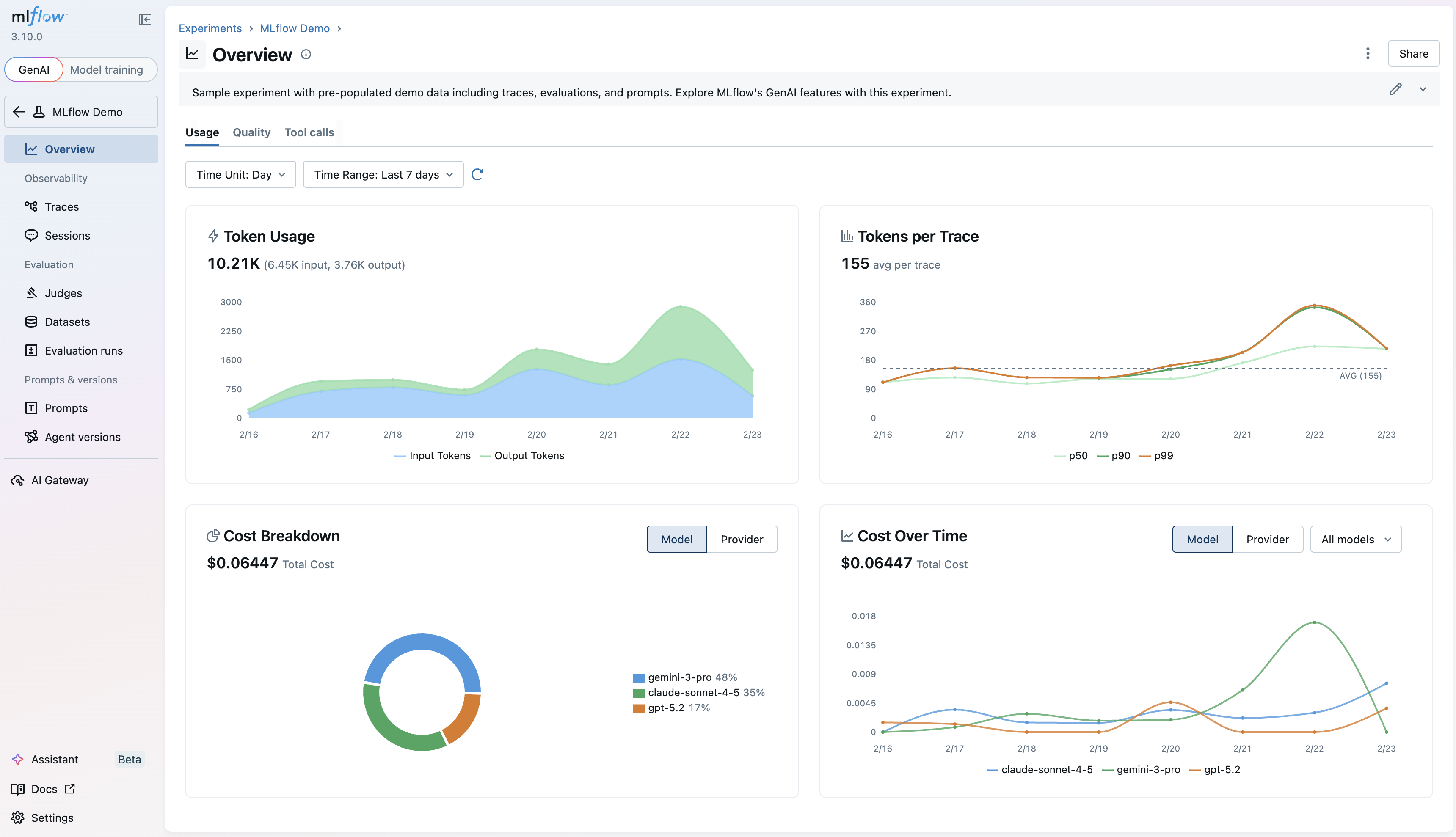
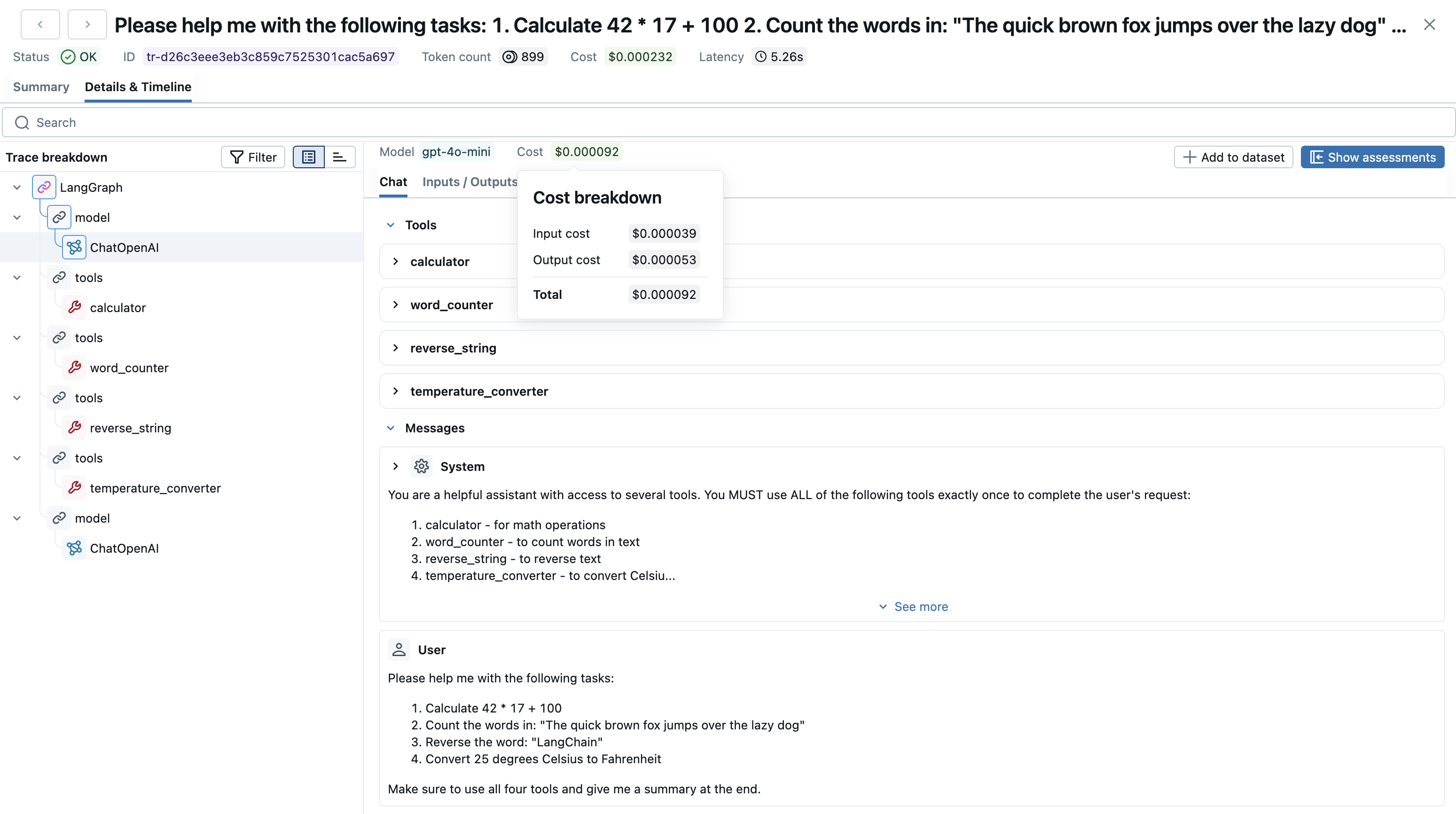
Gain visibility into your LLM spending! MLflow now automatically extracts model information from LLM spans and calculates costs, with a new UI that renders model and cost data directly in your trace views. Additionally, costs are aggregated and broken down in the "Overview" tab, giving you granular insights into your LLM spend patterns.
Learn more about trace cost tracking
4. Navigation bar redesign
As we continue to add more features to the MLflow UI, we found that navigation was getting cluttered and overwhelming, with poor separation of features for different workflow types. We've redesigned the navigation bar to be more intuitive and easier to use, with a new sidebar that provides a more relevant set of tabs for both GenAI apps and agent developers, as well as classic model training workflows. The new experience also gives more space to the main content area, making it easier to focus on the task at hand.
5. MLflow Demo Experiment
New to MLflow GenAI? With one click, launch a pre-populated demo and explore tracing, evaluation, and prompt management in action. No configuration, no code required. This feature is available in the MLflow UI's homepage, and provides a comprehensive overview of the different functionality that MLflow has to offer.
Get started by clicking the button as shown in the video above, or by running mlflow demo in your terminal.
6. Gateway Usage Tracking
Monitor your AI Gateway endpoints with detailed usage analytics. A new "Usage" tab shows request patterns and metrics, with trace ingestion that links gateway calls back to your experiments for end-to-end AI observability.
To turn this feature on for your AI Gateway endpoints, make sure to check the "Enable usage tracking" toggle in your endpoint settings, as shown in the video above.
Learn more about Gateway usage tracking
7. In-UI Trace Evaluation
Run custom or pre-built LLM judges directly from the traces and sessions UI, no code required! This enables quick evaluation of individual traces and individual without context switching to the Python SDK. In order to use this feature, make sure to set up an AI gateway endpoint, as you'll need to select an endpoint to use when running LLM judges.
Full Changelog
For a comprehensive list of changes, see the release change log.
What's Next
Get Started
Install MLflow 3.10.0 to try these new features:
pip install mlflow==3.10.0
Share Your Feedback
We'd love to hear about your experience with these new features:
- GitHub Issues - Report bugs or request features
- MLflow Roadmap - See what's coming next and share your ideas
- ⭐ Star us on GitHub - Show your support for the project
Learn More
- Join our upcoming webinar to see these features in action
- Check out the MLflow documentation for detailed guides


